Hume Cabin User Form
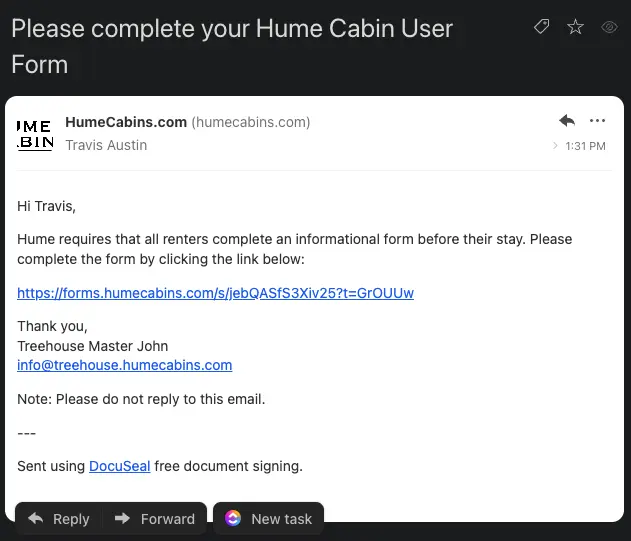
When a booking request is submitted by a potential renter, the booking system will automatically send the renter an email asking them to complete the "Hume Cabin User Form". The email will include a link that is unique to this booking request,.
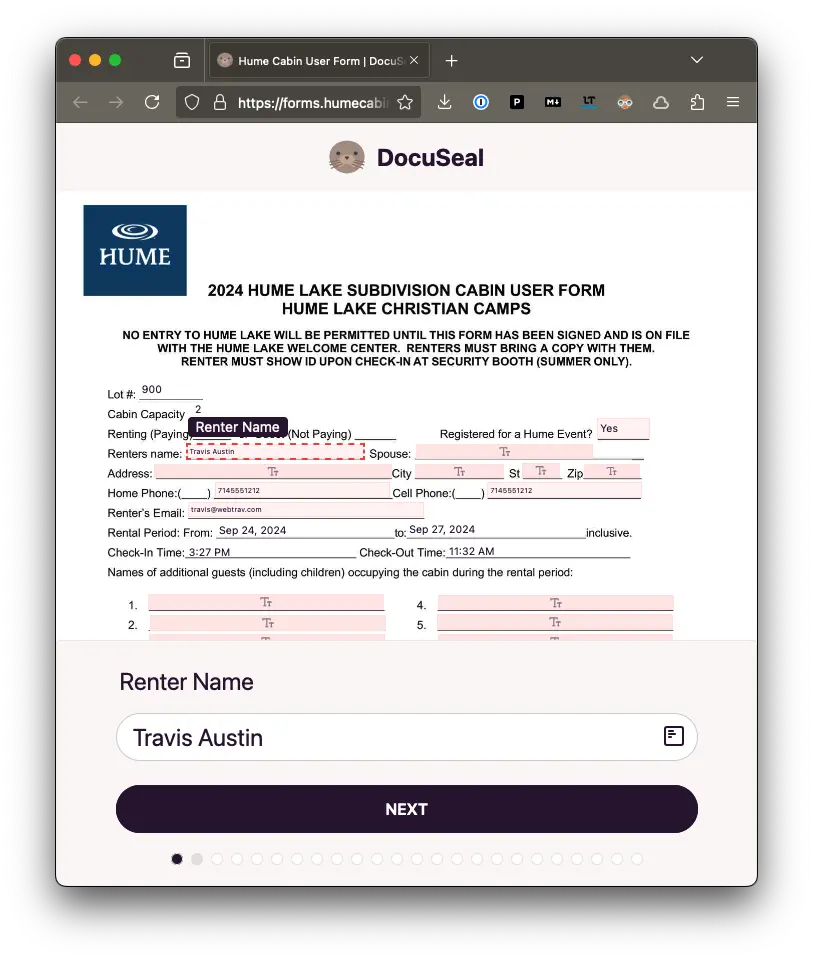
The renter will need to click the link. They will see the Hume Cabin User Form and should complete the form fields that are presented.
The rental form asks the renter for information such as their name, spouse's name, address, phone number, and additional cabin occupants. Much of the information is pre-populated automatically from their booking form.
The form also includes several fields (cabin number, maximum occupancy, start and end dates, check-in and check-out times) that will be automatically populated by the system and cannot be edited by the renter.
The renter should review all the form fields and sign and submit the completed form.
When the renter completes the form, the system will then email you and request you to review and sign the same form. Several fields will be pre-populated for you but will be editable, including the cabin number, maximum occupancy, start and end dates, check-in and check-out times fields. You should not need to modify any of these fields, but you may modify them if necessary.
Once you have completed the form, the system will email a fully-signed copy of the form to the renter and to you.
You should forward this completed form to Hume Lake Christian Camps.